What Not to Plug Into a Smart Plug in the UK
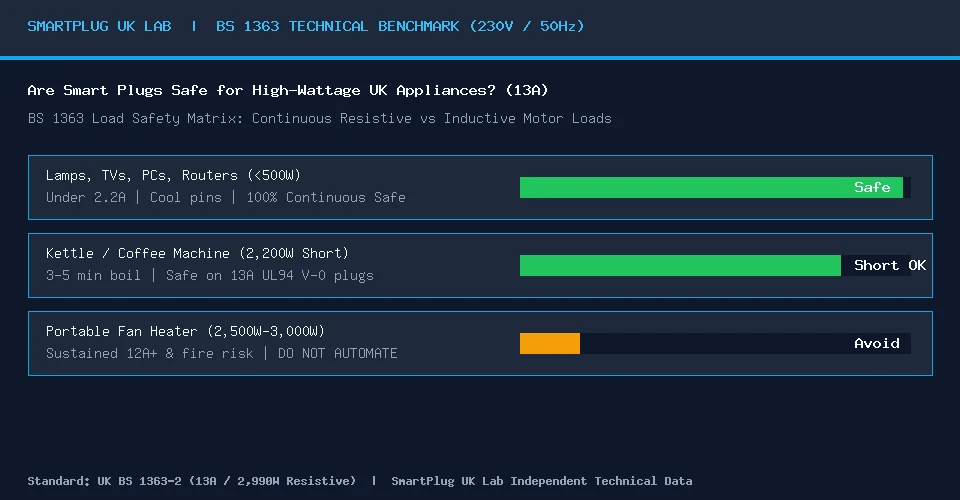
Short answer: a smart plug is a remote-controlled switch in a small plastic case. It is fine for lamps, chargers, TVs and similar low-power devices. It is the wrong tool for anything that gets hot, anything that draws close to 3 kW, anything that must never lose power, and anything that lives outside or near water. The reasons are below, so you can judge the cases we have not listed.
Safety notice. This is general information, not electrical advice. Always follow the appliance and smart plug manufacturers’ instructions. Never leave heating appliances running unattended on a timer or smart plug unless the appliance manufacturer explicitly allows it. For fixed wiring, or if anything is hot, damaged or smells burnt, stop using it and contact a registered electrician.
The numbers behind the advice
A UK 13A plug (BS 1363) is protected by a fuse of up to 13 amps. At 230 V that is about 2,990 W. TP-Link’s Tapo P110M datasheet lists exactly this: "13 A, 2990 W".
That is the absolute ceiling, not a comfortable working figure. TP-Link’s own guidance for smart plugs says the load should not exceed 80% of the rated maximum. For a 2,990 W plug that is about 2,390 W. Anything above that, run for hours, is outside the maker’s advice.
Rated power is also not the whole story. TP-Link warns that motor-driven appliances (it names air conditioners, fridges, washing machines, fans, pumps and vacuum cleaners) can draw a much higher current at start-up, which "may damage the smart plug even if the device’s rated power appears to be within the supported limit."
Quick guide
| Appliance | Verdict | Why |
|---|---|---|
| Lamps, TVs, consoles, phone and laptop chargers | Fine | Low power, no heat risk |
| Fans, air purifiers, dehumidifiers | Possible with checks | Motor start-up current; check the manual (see fans, purifiers and dehumidifiers) |
| Washing machine, dishwasher, tumble dryer | Avoid | High load, heat, cutting power mid-cycle (see large appliances) |
| Portable heaters (fan, oil-filled, convector) | Do not automate | Fire risk if left unattended or running while you sleep |
| Electric blankets | Only as the maker allows | Read below |
| Electric towel rail, underfloor heating | No | Usually hardwired; bathroom rules |
| Fridge, freezer, medical equipment, alarms | No | A missed or accidental switch-off has real consequences |
| Immersion heater, boiler, central heating pump | No | Fixed-wired, 3 kW or more; see immersion heaters |
| EV "granny" charging cable | No | Hours at high current; see EV cables |
| Portable air conditioner | Avoid | High start-up current, 1 kW or more |
| Hot tubs, pond pumps, anything outdoors or in a wet area | No | Water, RCD protection and weatherproofing are different problems |
| Kettles, toasters, hair dryers | Not worth it | 2 to 3 kW and you have to be there anyway |
Heaters: the biggest risk
Electrical Safety First, the UK electrical safety charity, advises: "Never leave your heater unattended while in use or while you are asleep," and recommends not using a portable heater overnight. If you do run one overnight, it suggests a lower-risk type such as an oil-filled radiator and keeping combustibles at least a metre away. It also says to avoid powering a heater from an extension lead because they "can easily be overloaded".
A smart plug adds a plug, a relay and a wireless module between the wall and the heater, and removes the one safeguard you had: you in the room. A heater that switches on while you are out, or runs late because you forgot to cancel the schedule, is exactly the situation that advice warns against. Heaters usually draw 1 to 3 kW, which also takes a 13A plug close to its ceiling for hours.
If you want a warm room on arrival, use the heater’s own thermostat and timer, or a heating system built for it.
Electric blankets
Electrical Safety First says that if a blanket is to be left on overnight it should have temperature controls plus automatic shut-off and overheat protection, advises unplugging it when you get into bed (unless it is designed for overnight use), and recommends replacing blankets about every ten years. It does not mention smart plugs. Using one to pre-warm a bed for a short, fixed time is a common idea, but we have no manufacturer evidence that it is safe for your blanket. Check the instructions: if they do not allow external timers, do not use one. And inspect the blanket for scorch marks, frayed wires or rodent damage before it is plugged in at all.
Cooking and large appliances
Washing machines, dishwashers and tumble dryers combine high power with heating elements and motors. Electrical Safety First advises avoiding running washing machines and tumble dryers overnight if possible, and switching them off at the socket when you go out, and cutting power mid-cycle can leave water in the machine. Every modern one has delay start, which does the same job as a plug without the risk. Our large appliances guide covers this.
Things that must never lose power by accident
Fridge-freezers, medical equipment, burglar and smoke alarms, and broadband equipment you rely on should not sit behind a switch that an app, a schedule, a firmware update or a child can turn off. If you want to monitor a fridge’s consumption, use a plug only if you can disable remote and button switch-off, and accept that you are taking a risk with the food. A better option is a monitor that clamps onto the cable and does not interrupt the circuit.
Water, outdoors and bathrooms
Do not use an ordinary plug-in smart plug outdoors or anywhere damp. Outdoor equipment needs an outdoor-rated product, a weatherproof enclosure and RCD protection (see outdoor smart plugs). Hot tubs and inflatable spas, pond pumps and aquarium heaters are better served by their own controllers. Bathrooms have strict rules about where sockets can be, and a smart plug is not a way around them.
Hardwired equipment
Boilers, central heating pumps, underfloor heating and immersion heaters are normally wired to the home’s circuits, often through a fused spur, not a 13A plug. Controlling them is a job for a suitable thermostat, programmer or smart relay installed by a qualified electrician. Do not replace a fixed connection with a plug to fit a smart plug.
Warning signs
Stop using the plug and unplug it safely if it is hot to the touch, smells burnt, makes noise, is discoloured, or the socket looks scorched or loose. TP-Link gives the same advice. Do not use it again until it has been checked, and replace anything damaged. Keep plugs in open, dry areas away from heat and direct sun.
What smart plugs are good for
Cutting standby power on a TV and games console, timing lamps, resetting a frozen router, seeing what a low-power device costs to run, and controlling an appliance by voice when it is safe to do so. See Best smart plugs for UK homes and the running-cost calculator.
Sources
- Electrical Safety First: portable heaters; electric blankets.
- TP-Link support: guidance on smart plug maximum load and appliances to use with caution.
- TP-Link Tapo P110M (UK) datasheet: 13 A, 2990 W rating.
Frequently asked questions
Can I use a smart plug with a heater? We advise against it. Electrical Safety First says never to leave a heater unattended or running while you sleep, and not to power one from an extension lead. A smart plug adds another point of failure and can switch a heater on when nobody is there.
What is the maximum wattage for a UK smart plug? A 13A plug is limited to about 2,990 W at 230 V. TP-Link advises staying under 80% of a plug’s rating, which is about 2,390 W for a 2,990 W plug.
Can I put a fridge-freezer on a smart plug? We recommend not. An accidental or scheduled switch-off can spoil food. If you want to monitor consumption, use a clamp-style monitor that does not interrupt the circuit.
How this guide is made. We write from manufacturer specifications, official guidance and published tariffs. We have not tested these products ourselves. Drafts are prepared with AI assistance and checked against the sources listed on this page. They are not reviewed by a qualified electrician. Last checked: 2 November 2026. Spotted a mistake? Email editorial@uksmartplugs.co.uk. See How we work.